 Zinn® Ads
User guide
Read your daily Google Ads audit
What the Zinn® Ads daily audit looks at in each connected account, where each finding appears, and how to act on it, from Needs you to Changes.
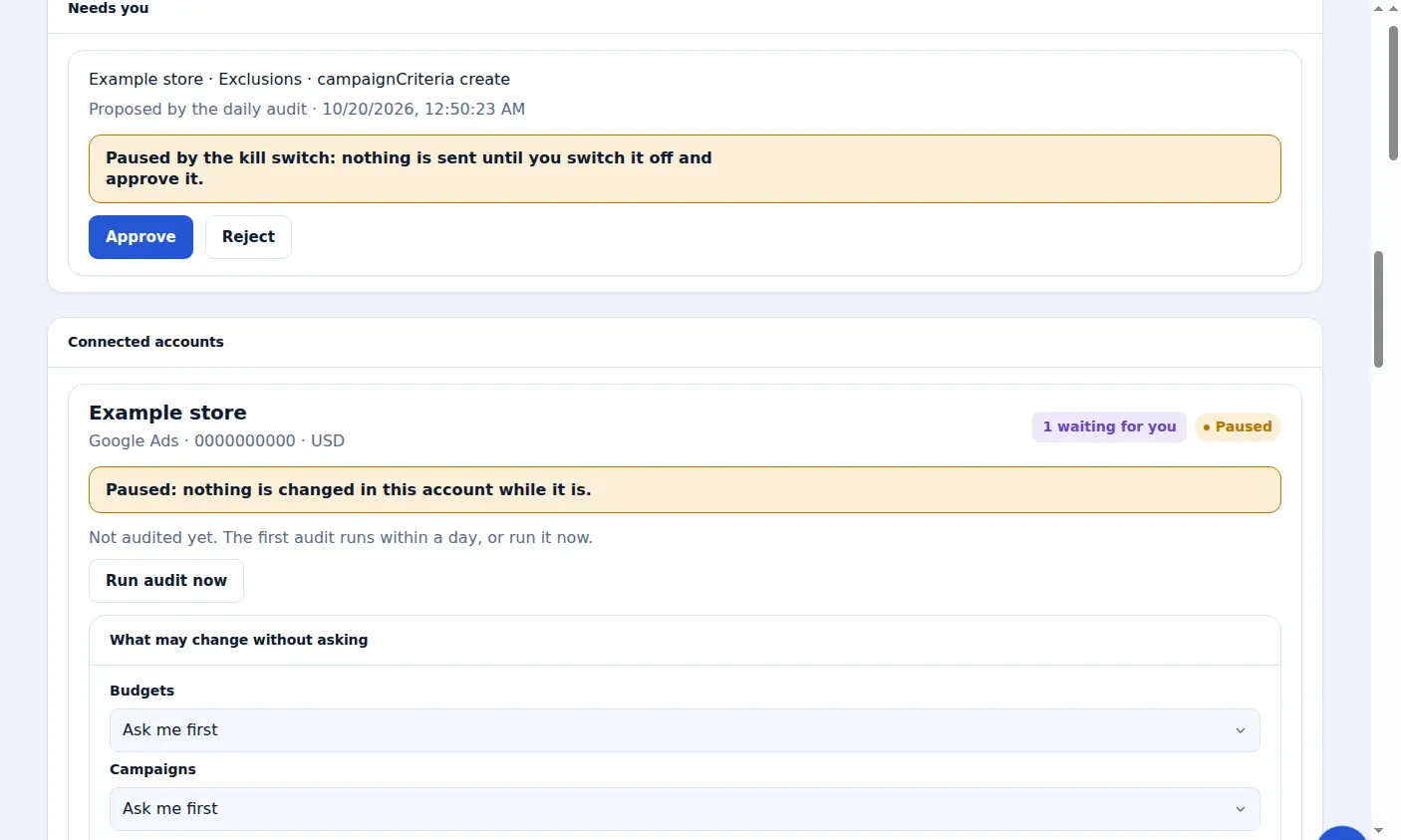
Let the audit run
The audit runs every day for every connected account. To run it straight away, press Run audit now on the account's card. Until the first run, the card says Not audited yet.
Read the last audit line
The account's card shows the last audit: how many changes are waiting for your approval and how many were made automatically. If the audit could not read the account, the card says so; try again shortly.
Read what it proposes
Each proposal is a change marked Proposed by the daily audit, such as a negative keyword for a search that spends and never converts, a keyword that never converts, a budget that goes unspent or an ad Google disapproved.
Approve or reject
Proposals wait under Needs you. Approve applies the change in your account straight away; Reject changes nothing. Both are recorded under Changes.
Watching your account
The Watching your account card adds three daily readings: where this month's spend will end against its target, whether each conversion action still records, and the clicks and sales your campaigns miss because of their budget or ad rank.
Microsoft Advertising accounts
A connected Microsoft Advertising account gets its own daily audit, which reads the account and changes nothing in it.
Problems found for you, each with its fix
Every daily check reads your account for what holds it back: a campaign losing impressions to its budget or to ad rank, a landing page Google rates below average, a negative keyword blocking one of your own keywords, a disapproved or policy-limited ad, missing sitelinks, an empty ad group. Each one is shown under What we found with its figures and the fix, such as moving budget from a campaign that has some to spare. One click applies it, with an Undo, or on autopilot it is fixed for you. You never have to go looking.
Every ad's landing page checked, with the fix
Every day Zinn® Ads opens the page each of your ads sends people to, the way a phone shows it, and says what is wrong: the page is broken or redirects, it is in a different language from the campaign, it never names the competitor or the search people typed, the main button is below the first screen, it loads slowly, or Google rates it below average. Each problem comes with its fix and, when your account already has a better page, the address of that page in the campaign's language. With automatic changes on, ads on a page that is gone are paused and ads on a redirect point straight at the final page, both with Undo; otherwise each is one click.
Your own rules, previewed on your real figures
Write a rule in plain parts: if cost with no conversion over the last 7 days is more than 50, pause the campaign; or lower or raise a budget, or just tell you. Before you save it, you see what it would have done on your last 30 days. Each rule runs once a day with a run log, waits for your approval unless you choose automatic, stays inside your spend ceilings, never touches a campaign you locked or one still learning, and every change it makes can be undone for 30 days.
Your main keywords at the top of the page
Give a campaign a top-of-page goal: its main keywords and the share of searches where your ad should show at the top, or in the very first position. Every day Zinn® Ads measures that share and names what holds it back, in order: a main keyword the campaign does not bid on, the ad's relevance, the landing page, the expected click rate, then the bid and the budget. Each fix is priced from Google's and Microsoft's own top-of-page bid estimates, and a budget is never proposed below about 20 top-of-page clicks a day; when that does not fit, it says to concentrate the budget instead. Nothing changes until you approve it, and every change has an Undo.
Next part: Part 2 of 3
A real screen from the Zinn® Ads dashboard, with example account names.
The feature this guide sets up: Google Ads audit
Next guide: Review the negative keywords found in your search terms
Included free with Zinn Digital® hosting
Host with Zinn Digital® and the click shield is free
On our hosting the click-fraud shield runs on the server, with nothing to install and nothing to pay.